

What Is Django? Best Use And Models For Beginners
Django is a name synonymous with robust web application development. Designed to build apps quickly with less code, this powerful Python framework is a great choice for programmers and web developers alike. Whether you are fresh blood in the tech sector looking to kickstart a successful web development career, this beginner’s guide to Django will cover all aspects from explaining the benefits, installation and how to build your first Django app, let’s get started.
First things first, what is Django? Let’s start with that.
This free, open-source web framework, built with Python, is designed for creating complex web applications and database-driven websites efficiently. Python, being one of the best programming languages for web development, powers Django to focus on reusability through the DRY (Don’t Repeat Yourself) principle. Additionally, Django offers a wide range of ready-to-use features, making it a preferred choice for developers.
This includes a login system, database connection, and CRUD operations. It is maintained by the Django Software Foundation (DSF). Some of the most popular and well-known websites developed using the Django framework guide include Instagram, Mozilla, Clubhouse, etc.
The Core Components of Django
Before building a website in Django, as a developer, you must know that the Django framework guide follows the MVT architectural pattern which includes Models, Views & Templates. Therefore, these are the major core components of Django that are involved in building a website. Let’s learn more about them in detail.
Models
Models are essentially Python classes that represent the structure and behavior of the data. You can consider them as the blueprints for the information your website primarily deals with. One of the Django model’s best practices is that it allows you to interact with the database using Python code and manage all the database stuff, you don’t have to write complex code. They are located in the models.py file.
Views
When users visit your website and interact with elements, how does Django decide what to show? Through views. This function processes user requests, interacts with the model, retrieves data and passes it to the template where it is displayed. Views are classified into Function-based views, Class-based views & Generic class-based views
Templates
The templates are responsible for determining how your web application or website should look and feel to users. They mainly define the HTML structure and content that will be displayed to the user. The following is the basic syntax of a template used to insert dynamic content into the HTML page.
HTML
{{ variable_name }}
Here the variable name section is replaced with the required content to be displayed.
Learning To Install Django
Code References:????
As Django is a web framework based on Python, it is important to have Python installed on your system. You can download the latest version of Python from their official website in case you haven’t done it yet. With this beginner’s guide to Django, you can check whether your system has Python installed. This involves entering the following command in the command prompt:
python –version
You will get a result like the one shown below if Python is installed along with the version number.
Python 3.13.1
With that part cleared, let’s move on to the next important component i.e. PIP. This package manager must be used to install Django. In simple words, you must have both Python & PIP installed on your system to make use of the Django web framework successfully.
If you are wondering where to download PIP, there’s no need to worry as it is included in Python from version 3.4 onwards. Just like checking if Python is installed, it is possible to check if PIP is installed on your system by running this command:
pip –version
If PIP is installed, you will get a similar result as shown with Python along with the version number. Now that you have both Python & PIP installed, it’s time to learn to install and make use of Django by running the following command:
py -m pip install Django
Building Your First Application
????
See how simple it is to install Django. Now that you have learned what is Django and how to install it, let’s learn how to build our first app by following the Django framework guide. The first thing to do is create a new project by entering the following command:
django-admin startproject myblog
The above command creates a new project named myblog along with additional content which is shown below:
myblog
manage.py
myblog/
__init__.py
asgi.py
settings.py
urls.py
wsgi.py
manage.py: Using this command line utility (CLI), you can interact with your Django project in several ways.
myblog/: This is your project’s actual Python package directory.
__init__.py: This special file tells Python to mark this specific directory as a Python package.
settings.py: This is where you can define various settings for your Django project.
urls.py: This file defines the URL patterns that map incoming web requests to the appropriate views within your application
asgi.py & wsgi.py: These serve as the entry points for ASGI-compatible web servers.
Now that you have a Django Project, you have to verify whether it runs and what it looks like in a browser. To achieve that part, go to the myblog directory and enter the following command:
py manage.py runserver
After that, you will be presented with the following result, which is as follows:
Performing system checks…
System check identified no issues (0 silenced).
You have unapplied migrations; your app may not work properly until they are applied.
Run ‘python manage.py migrate’ to apply them.
December 04, 2024 – 15:50:53
Django version 5.1, using settings ‘myblog.settings’
Starting development server at http://127.0.0.1:8000/
Quit the server with CONTROL-C.
To see what it looks like on a browser, open a new window and type 127.0.0.1:8000 in the address bar. As shown below, this is what you will see upon hitting enter.
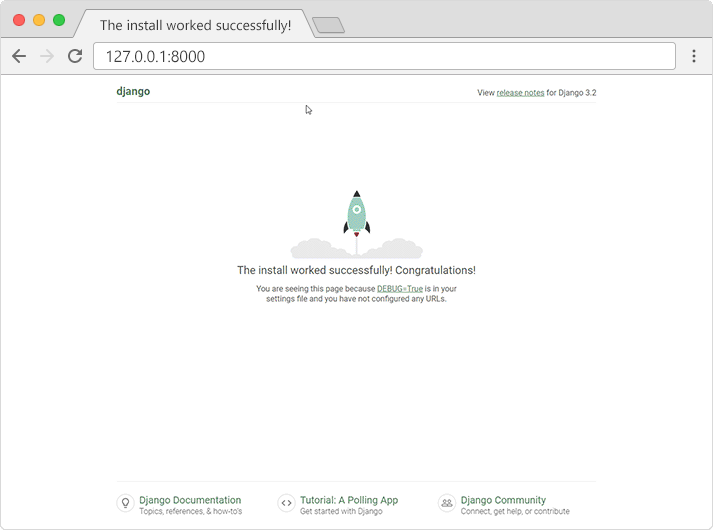
Now that your virtual environment for your project has been set up, it’s time to dive more into the beginner’s guide to Django and make an app for your project. You can’t create a web page using Django without an app. If you are wondering what an app is, it is a web application that does some function whereas a project is a collection of configurations and apps for a particular website.
In this example, we name our app as “posts”. To create your app or web application, it is important to be in the same directory as manage.py and enter the command below.
py manage.py startapp posts
This will create a folder named posts in the myblog project and will display something similar as shown below:
myblog
manage.py
myblog/
members/
migrations/
__init__.py
__init__.py
admin.py
apps.py
models.py
tests.py
views.py
The next step is to build a model for the posts app. To do that, navigate to posts/models.py and input the following codes:
from django.db import models
class Post(models.Model):
title = models.CharField(max_length=100)
content = models.TextField()
date_posted = models.DateTimeField(auto_now_add=True)
What this code does is create a way that keeps track of your blog posts with a title, post content, and the posted date. Enter the following command to make the above code work with your blog database.
python manage.py makemigrations
python manage.py migrate
Views are essentially Python functions that are used to receive web requests from the user, process them and return them as responses. They are usually put inside the views.py file which is located on your app’s folder. Let’s write a view to show all the posts with the following code:
from django.shortcuts import render
from .models import Post
def home(request):
context = {
‘posts’: Post.objects.all()
}
return render(request, ‘posts/home.html’, context)
As shown in the above code, this picks the posts from the database and makes them ready to display on the webpage. But how does the framework know where to find this page? That’s where URLs come in. Navigate to myblog/urls.py and add the following code:
from django.urls import path, include
urlpatterns = [
path(”, include(‘posts.urls’)),
]
And in posts/urls.py, set up a path to your home view:
from django.urls import path
from . import views
urlpatterns = [
path(”, views.home, name=’blog-home’),
]
As the Django framework guide follows the MVT design pattern i.e. Model, View & Template, the overall layout of the webpage to be shown must be in HTML format and should be created using a template. Here we are going to create a template named “home.html” inside the posts/templates/posts directory. This code loops through each post and displays its title and content on the webpage.
{% for post in posts %}
<h2>{{ post.title }}</h2>
<p>{{ post.content }}</p>
{% endfor %}
Now that the main components for your project myblog are defined and ready, it’s time to see it in action. This is done by entering the command shown below:
python manage.py runserver
Once executed, open your web browser and go to http://127.0.0.1:8000. You should see your blog project along with the various posts displayed. This is an example of building a basic app in the beginner’s guide to Django and is only getting started. It is possible to add more features and elements that further enhance the blog’s functionalities
Winding up
When building simple web applications or complex websites, Django is one of the top web frameworks to choose from. Several built-in features make it much easier to code and manage neatly. In this blog, we have covered various areas, including explaining what Django is, the core components, learning how to install Django and the basics involved in developing a simple Django web app. That should suffice your needs however consulting with the best web development agency in UAE is a great way to learn more about this robust open-source framework.
FAQs: Django – Python web framework
What is Django and why is it popular?
It is a high-level Python web framework that encourages rapid development and clean, pragmatic design. Built by experienced developers, the django framework handles much of the hassle of web development, so you can focus on writing your app without needing to reinvent the wheel.
What is Django mostly used for?
It is primarily used for building secure and scalable backends. Because it follows a “batteries-included” philosophy, the use of django is ideal for complex, data-driven sites like Instagram or Pinterest, as well as enterprise-level website development projects that require robust security.
Is Django used for frontend or backend?
Django is strictly a backend (server-side) framework. It manages the database, server logic, and APIs. However, it can work seamlessly with any frontend technology, which is why a web development company in Dubai will often pair Django with React or Vue for a complete full-stack solution.
Is Django still relevant in 2026?
Absolutely. Its focus on security, scalability, and AI-integration makes it more relevant than ever. As Python continues to dominate the AI landscape, the django python ecosystem remains the gold standard for building the web interfaces that power modern machine learning applications.
Which model does Django use for architecture?
Django uses the MVT (Model-View-Template) architecture. In this django framework guide, the ‘Model’ handles data, the ‘View’ manages the logic, and the ‘Template’ controls the presentation. This separation makes it an excellent beginners guide to django for learning organized coding.
What are the django models best practices?
Following django models best practices is essential for performance. You should always use descriptive field names, keep your logic in the “Models” (Fat Models, Skinny Views), and use related_name for relationships. These habits are fundamental in any professional python django tutorial.
Can I learn Django in 3 days?
You can certainly grasp the basics and launch a “Hello World” app using a django tutorial. However, mastering the framework, including its advanced ORM and authentication systems, takes longer. Most web development services require developers with months or years of deep hands-on experience.
What is django best use and models in python for beginners?
What is django best use and models in python? For beginners, the best use is building a “CRUD” (Create, Read, Update, Delete) application like a blog or task manager. This helps you understand how django models interact with the database using Python’s simple syntax.
Are there any good Django projects for beginners?
Great Django projects for beginners include building a personal portfolio, a polling application, or a simple e-commerce store. These projects are featured in almost every beginners guide to django because they cover the essential features of the framework, from URL routing to template rendering.
What is python django used for in enterprise environments?
What is python django used for in large companies? It is used to build highly secure platforms. Django protects against common threats like SQL injection and cross-site scripting by default. This makes it the preferred django framework for fintech, healthcare, and government portals that cannot afford security breaches.

Related Post
Publications, Insights & News from GTECH